 Fast delivery across SA · support@techniworld.com

3 November 2026 · Techniworld
Where does your data go? Part 1: Understanding local AI, edge computing and digital sovereignty
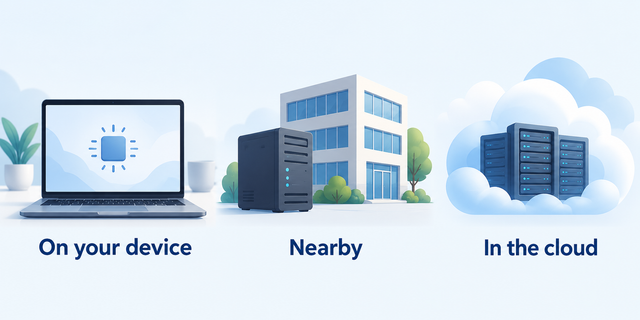
When you use an app to write, recognise speech or analyse information, where does that work actually happen? It might take place on your device, on a nearby server, or on a company’s servers accessed through the internet.
Understanding the difference helps make sense of three terms often appearing in technology discussions.
Cloud computing: using computers elsewhere
Many online services send information to remote servers for processing. Those servers do the work and return the result to your device.
This gives access to computing power without having to own all the equipment yourself. It also means considering what information is sent, who handles it and what happens when the connection is unavailable.
Edge computing: bringing the work closer
Edge computing processes information close to where it is collected. That could mean inside a device or on a nearby computer at a business premises.
For example, a factory might analyse camera images locally to identify production faults, rather than sending every image to a distant server. This can reduce delays and the amount of information travelling across the internet.
Edge computing does not always involve AI.
Local AI: running AI on your device
Local AI performs AI tasks on a computer or other device you control. On supported Windows 11 computers, live captions can turn speech into on-screen text using processing on the device after the required language files are downloaded.
Some AI language models can also run locally. Their usefulness and speed depend on the model, software and available hardware.
Digital sovereignty: having control
Digital sovereignty is the broader question of control over technology and data. Who can access your information? Can you move it to another service? How dependent are you on one supplier?
Local processing can support greater control, but does not automatically guarantee privacy or security. Software settings, online connections and the way information is stored still matter.
In the next part, we’ll explore practical uses of local AI and what today’s computer hardware can and cannot support.
Cloud computing: using computers elsewhere
Many online services send information to remote servers for processing. Those servers do the work and return the result to your device.
This gives access to computing power without having to own all the equipment yourself. It also means considering what information is sent, who handles it and what happens when the connection is unavailable.
Edge computing: bringing the work closer
Edge computing processes information close to where it is collected. That could mean inside a device or on a nearby computer at a business premises.
For example, a factory might analyse camera images locally to identify production faults, rather than sending every image to a distant server. This can reduce delays and the amount of information travelling across the internet.
Edge computing does not always involve AI.
Local AI: running AI on your device
Local AI performs AI tasks on a computer or other device you control. On supported Windows 11 computers, live captions can turn speech into on-screen text using processing on the device after the required language files are downloaded.
Some AI language models can also run locally. Their usefulness and speed depend on the model, software and available hardware.
Digital sovereignty: having control
Digital sovereignty is the broader question of control over technology and data. Who can access your information? Can you move it to another service? How dependent are you on one supplier?
Local processing can support greater control, but does not automatically guarantee privacy or security. Software settings, online connections and the way information is stored still matter.
Cloud and local computing can also work together. The useful question is which arrangement suits the task and gives you an appropriate balance of capability, convenience and control.
In the next part, we’ll explore practical uses of local AI and what today’s computer hardware can and cannot support.